A step-by-step guide for selling digital products as a side hustle
Step 1: Create a seller account on Envato
To get started, create an Envato account, select Author/Seller, and add your tax information, such as a W-8BEN form.
Link your preferred payout method, like PayPal, Wire transfer, etc.
Step 2: Create the digital product
This is the hardest part because building a high-quality digital product takes a lot of work. Test it multiple times to ensure it passes Envato’s review process.
Write detailed documentation and include common troubleshooting instructions. Creating Video tutorials also helps a lot.
Incomplete or low-quality documentation often confuses buyers and negatively affects your item’s rating and reviews.
Finally, integrate a licensing module to prevent piracy. Envato offers a built-in licensing system that you can use to protect your products from black-market sales to some extent.
Step 3. Package your source file
Envato enforces a strict folder structure. If you don’t organise the files properly before submitting, they will automatically reject it.
You must create a master .zip file that contains the core product, a dedicated documentation folder (explaining installation and customisation for buyers), and any demo assets.
Step 4. Design Marketplace Assets
You cannot just throw in the source code with a basic title and description.
You must create graphics at the resolution required by Envato, host a live demo on your server for PHP scripts, HTML templates, themes and wordpress plugins, and share login credentials if buyers need to log in to use the demo.
For Android and iOS apps, you can either link the demo app on the app stores or offer a Google Drive link to download the demo app file.
Step 5. Submit for review
Once everything is ready, upload your assets to your chosen marketplace dashboard. You will need to write an SEO-friendly title, list key features, apply accurate tags, and select all supported software or browser versions.
Make sure the claims made in the listing are accurate and not misleading.
Step 6. Clear the Review Process
Envato manually reviews every submission for commercial viability and code quality. If you receive a soft rejection, the reviewer will list specific minor issues to fix before re-uploading. A hard rejection means the product does not meet their quality standards and cannot be resubmitted.
A hard rejection doesn’t mean you can’t sell it; you have plenty of options for selling digital products, and platforms like Gumroad let you sell your items without a review process.
Step 7: Promoting your item
Naturally, when an item is published on Envato, it will immediately get a lot of exposure because they have dedicated placements for new releases. If you make few sales at launch, your product will move to Rising Stars.
With good reviews and ratings, your items will soon be listed under the new best sellers category, which further boosts visibility because some buyers prefer to buy only from best sellers.
You can build a social media following and organically promote your product. If you have a marketing budget, consider creating a YouTube Short video of your item, highlighting use cases and features, and promote it with Google Ads. Often, YouTube Shorts ads deliver far more impressions at a lower cost than search ads.
Earning potential
Authors on Envato are making a good amount of money. Apart from selling the product, many authors offer paid customisation, installation, and custom integration. If you are available for freelance work, you can select an option in your Envato profile so buyers can offer you work. You can expect to make anywhere between £100 and £1000 per month on average.
Wrapping up
Selling digital products is a proven way to make significant money with minimal effort compared to other popular side hustles. By following the step-by-step guide, you can successfully start selling on Envato and offer other services to increase your revenue.
Before you do anything, write a detailed document.
What kind of app do you want to build?
What is the app’s USP?
What features will the MVP include?
How much will it cost to keep the app running?
How will you monetise the app?
What problem does your app solve?
How will you drive downloads?
UI designs and layout of your app.
Once this detailed document is ready, you will have much mental clarity for this project.
Step 2. Building the MVP.
Coding a mobile app takes shit load of time. You can code it yourself or use AI coding to build the basics, then review the code and write the rest of the logic and tests.
If you have a budget laptop/desktop, consider testing the app on a real device instead of using the built-in emulator. You can use USB debugging or wireless debugging to run the app on a real device.
Using a real device reduces load on your computer and gives you a better sense of how users will experience the app.
Step 3. Testing the app.
Test the app yourself on a real device, and if it runs perfectly, consider using RoboTest on Firebase to automatically test the app on multiple devices simultaneously.
Step 4. Implement Analytics and Crashlytics
Using Firebase, you can implement App Analytics and Crashlytics. This will help you identify issues, understand root causes, and debug and push fixes easily.
Step 5. Signing the app
Once testing is done, you can sign the app and safely store a copy of the key on an external SSD or in private cloud storage. If you move to another device or lose the key, you will have a backup to sign updated app code in the future.
Step 6. Publishing the app
Generate a signed Android App Bundle or IPA if you are submitting to the Apple App Store, and submit the app for review along with a proper listing.
If your app requires users to create an account to access certain features, create a test account and submit the login credentials so reviewers can test the features.
The review process usually takes about 1 to 2 weeks; in rare cases, it could take more than 20 days.
During this time, you can start building social media accounts and prepare a marketing blueprint.
Once you receive the confirmation email that your app has been published, download your app from the App Store/Play Store and test it.
Sometimes you will find issues with the app after it is published on the store.
If you are using Firebase for auth, check if auth is working correctly. Usually, a signing key mismatch causes auth to stop working in production.
If the app is functioning as intended, share the app link on social media. Let people test it out.
I highly recommend you share your app on r/SideProject. Users and developers would love to test it and give you an honest review, which is quite useful for improving the app.
Step 7. Validation
The MVP is out; now you need to validate the app. If you have a marketing budget, consider running app install ads on Google Ads. Your goal should be to monitor a few things.
Ad Conversion Rate
CPI
Churn Rate
Crash Rate
In-app subscription opt-in rate (if applicable)
Average user time spent
Reviews and ratings
You can use these metrics to improve both the app and your marketing efforts. If all the metrics are poor, I would say you need to reconsider whether it is worth your time and money to work on the app.
Earning potential: The earning potential of the app you build depends on the monetisation method you choose and the user demographic. You can expect to make anywhere between £100 £10,000 a month on average.
Wrapping up.
I hope you understood the steps involved in building and maintaining a mobile app. The step-by-step guide isn’t perfect; I couldn’t cover everything in a si
A Step-by-step guide for doing affiliate marketing on Reddit
Step 1. Find a product or service to promote.
To get started, find a great product or service to promote. Choose products or services that solve a real pain point.
Instead of choosing random products or services to promote, choose ones you already use. That way, you have first-hand experience with the product/service; you can explain it better, and it will be much more convincing for people to buy.
The more people buy it, the more money you will make, and there is no limit on how much you can earn.
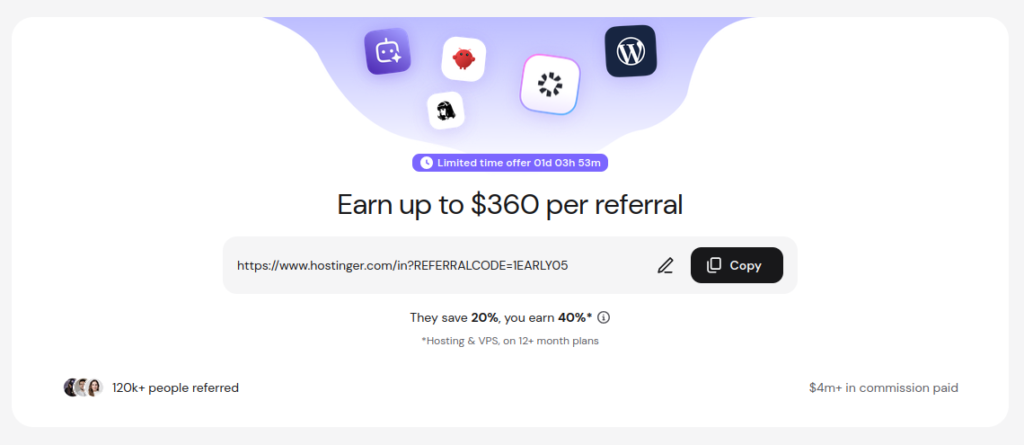
For example, I already use Hostinger to buy domains and host websites.
I have hosted multiple websites on Hostinger, and when I worked with clients, I recommended they buy web hosting plans and domain names on Hostinger.
Hostinger lets clients invite me using my email, which gives me role-based access to the specific products and services they want me to use. This way, they don’t have to share their account password with me.
They’ll let me access their web hosting on Hostinger so I can deploy websites, run tests, and configure everything.
Because I already have experience with Hostinger, I can answer questions about Hostinger’s services, which helps me convince clients to choose Hostinger.
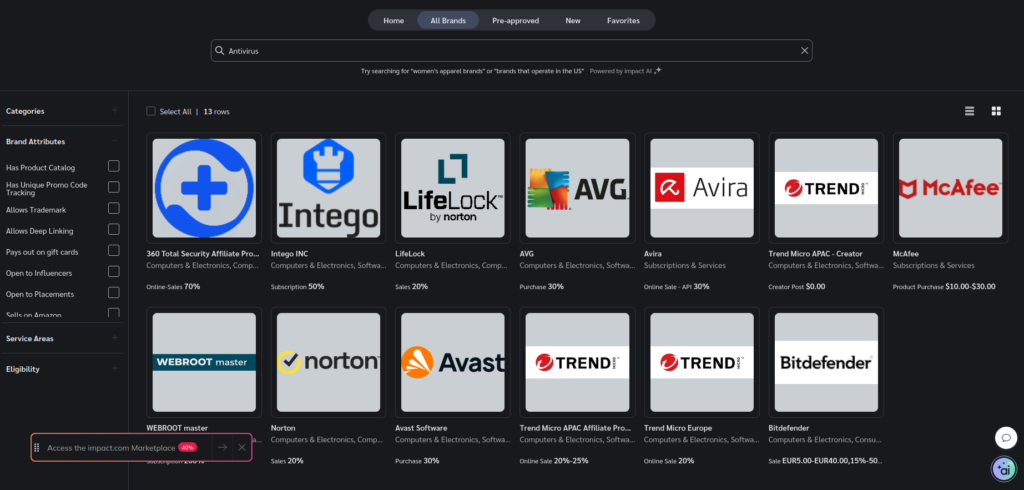
You should do the same. If you use a VPN, antivirus program, or any other service, chances are they too have an affiliate program.
Empire Flippers made a list of 200+ Top Recurring Affiliate programs you can use as a starting point.
Step 2. Monitoring Keywords on Reddit.
Once you have the affiliate link for a product or service, the next step is to find people talking about problems which the product or service could effectively solve.
For example, if you are promoting the Hostinger affiliate program, you can monitor keywords such as “Web Hosting”, “VPS”, “Domain name”, etc.
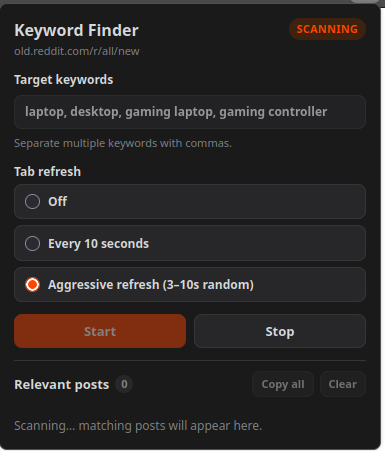
Monitoring keywords in real time is easy with the Keyword Finder for Old Reddit, which tracks fresh posts on Reddit and scans for the target keyword.
Open the Firefox browser and search for “Keyword Finder for Old Reddit Firefox Addon”.
Install it and pin it to the toolbar.
Visit https://old.reddit.com/r/all/new/, click the Keyword Finder extension icon, enter your target keyword (for example, “Winter Jacket”), and click Start.
Enable auto-refresh to automatically refresh the tab to continuously collect relevant posts in real time.
It may take some time to find relevant posts; meanwhile, you can switch to another tab to work or leave the computer running.
If you are in a hurry, paste your target keyword into the Reddit search bar and sort the results by the past hour. You will get a bunch of posts instantly to engage with.
Bookmark https://old.reddit.com/r/all/new/ so you can access it easily later.
Step 3 – Promoting affiliate products/services
As the extension finds relevant Reddit posts and lists them, click the post title and leave a helpful answer with your affiliate link.
With this method, your comment will be at the top because you are the first to comment on that post, which also grabs the attention of the person who made it; they will receive a notification that you’ve commented on their post.
Reddit posts often rank on Google. When people search on Google, they might land on those Reddit posts in future, and if your comment is convincing and helpful, some might click the affiliate link and buy.
Many affiliate programmes immediately place a cookie in the user’s browser, ensuring you earn a commission even if they check out 10 to 15 days later.
As you track more relevant posts and engage on Reddit, you can drive more clicks on affiliate links; some will buy the product or service through them, and your commission will continue to increase over time.
I recommend creating a blog or YouTube channel to promote the affiliate product/services. You can review the product, provide tutorials on how to use it, and tell your readers/viewers how it can solve their problem. This will greatly increase your chances of making sales.
Then embed the affiliate link in your blog post or YouTube channel description, and instead of pasting the affiliate link directly in Reddit comments, link to your YouTube channel or blog post.
That way, it will be less obvious that you are doing this just to promote an affiliate product, and the moderator and the Reddit spam filter will be less likely to remove your comment.
A blog or YouTube channel isn’t just a platform to promote stuff; it also builds authority. Many billion-dollar companies have affiliate programs, but to get accepted, you need a blog or a solid social media following. They will review your content on your blog or social media account before accepting your application.
If you already have a blog or YouTube channel and have experience in promoting products and services for brands, I highly recommend checking out Impact.com
Earning potential: Your earnings depend on the commission rate offered by the affiliate program you choose and how many sales you make. You can expect to make anywhere between £10 and £300 in your first month.
Wrapping up
I have covered the 3 simple steps for doing affiliate marketing on Reddit, and I hope you understood them.
If you are super lazy and don’t want to write comments yourself, use the pro version of Keyword Finder for Old Reddit.
It lets you generate helpful comments, automatically embed your affiliate link, and auto-fill the comment in a Reddit post. All you need to do is click submit.
Honestly, I will not recommend using the Pro version of Keyword Finder for Old Reddit. The comments it generates often sound like a sales guy, and as I said earlier, Redditors hate marketers. Sooo… It’s up to you, mate.
Edit: The pro version of Keyword Finder for Old Reddit isn’t published yet; I hope it will be available by December 2026.
A Step-by-step guide for starting a YouTube Channel
Step 1. Choosing a niche.
Choosing a niche is a very important step. You can’t just upload random content and expect people to follow you.
Consider choosing a niche you are passionate about. Something that is close to your heart, something you can talk about all day.
It could be video games, politics, science, finance, or crafts/DIY.
Once you choose a niche, create your YouTube channel, give it a unique name, and customise the logo and channel art to match it.
Step 2. Record the first video.
Take your phone or a camera and hit record. This is your first video; don’t expect it to be perfect. You might feel nervous and fumble while talking; that is completely normal.
When you are done with recording, edit and publish your first video.
Don’t focus too much on the thumbnail, audio quality, or editing quality.
This is your first video, not a masterpiece. It is a learning stage.
Step 3. Share on social media.
Your video will not magically get views; you will need to share it with like-minded people online. Don’t rely on YouTube’s mercy to push your video to the main feed; hustle and make your way.
Create a Notion page and list all the relevant subreddit that fits your niche.
Join those subreddits and engage with the audience before posting links to your YouTube videos.
Create accounts on Twitter (now x.com) and Instagram.
Consider sharing the same content on Instagram and Twitter. Build an audience on these platforms and funnel traffic to your YouTube channel.
Step 4. Learn SEO and Thumbnail design.
Tools like TubeBuddy will help you optimise your video listing so people who are searching can find your video on YouTube and Google.
There are tons of tutorials for TubeBuddy; go check them out, learn how to use its features and make the most of it.
SEO will help you get views consistently over time. You will need to do AB testing for titles and thumbnails, gather data and find what works best for you.
Data-driven decisions can snowball your growth and help you in the long run, instead of trying things randomly.
Step 5. Stop constantly looking at Analytics.
When people start a YouTube channel, they often spend their time staring at the analytics tab. Stop wasting time watching real-time subscriber metrics or video views; they won’t help you.
Instead, use your time to learn videography, editing, and collabing with other creators.
Step 6. Create a content calendar.
A content calendar will keep your upload schedule smooth.
Using Notion or Hootsuite, you can build a content calendar and track your progress.
Consistency is the key. I cannot emphasise this enough.
Step 7. Monetisation
After you meet the requirements for total watch hours and subscribers, you will be eligible for various options to monetise your channel.
Depending on your region, YouTube ads, Super Chats, memberships, and other monetisation opportunities will be available.
Earning Potential: I can’t give you an exact figure for how much you can earn by creating content on YouTube. Some creators earn £500 to £1000 a month, while top creators average £10000 a month. There is absolutely no limit on how much you can earn as a creator on YouTube.
Wrapping up
I hope you understand the steps to start and run a successful YouTube channel.
As you hit the record button for making the first video, the fear trap may take hold of you; be not embarrassed, don’t try to be perfect, every great thing takes time and shit load of effort.
Don’t judge yourself; remember: hit record, edit and publish.
I’m so tired of opening YouTube and seeing another 19-year-old in a rented Lamborghini telling me I can make £10k a month ‘passively’ by dropshipping.
If you’re anything like me, you don’t need a yacht—you just need the grocery, house rent, and electricity bill to stop feeling like a crisis every month.
The truth is, most side hustles being pushed online right now are either outright scams or pay literal pennies for hours of your time.
But after trying several different side hustles on the internet, I’ve found a handful of realistic ways to make real money on the side.
No MLM schemes, no filling out endless surveys for gift cards. Just 8 genuine side hustles that actually pay the bills.
These side hustles do require some effort; just to be clear, they are not a get-rich-quick scheme.
Often, I see people turn to YouTube and Instagram to find ways to earn money online, but unfortunately, many are misled by influencers and predatory businesses.
At some point, they feel like they will never be able to earn a decent amount of money online. Wondering what they are doing wrong?
Let me tell you the truth. You don’t need another course; you need genuine information and support.
I started as a freelance web developer. I built various websites, worked on multiple side projects, and failed hundreds, if not thousands, of times over the last 7 years. I learned what works and what doesn’t.
In this article, I will share with you 8 genuine side hustles and their pros and cons. I’ll also help you decide which one to choose.
Let’s get into the good stuff.
1. Monetising Screenshots
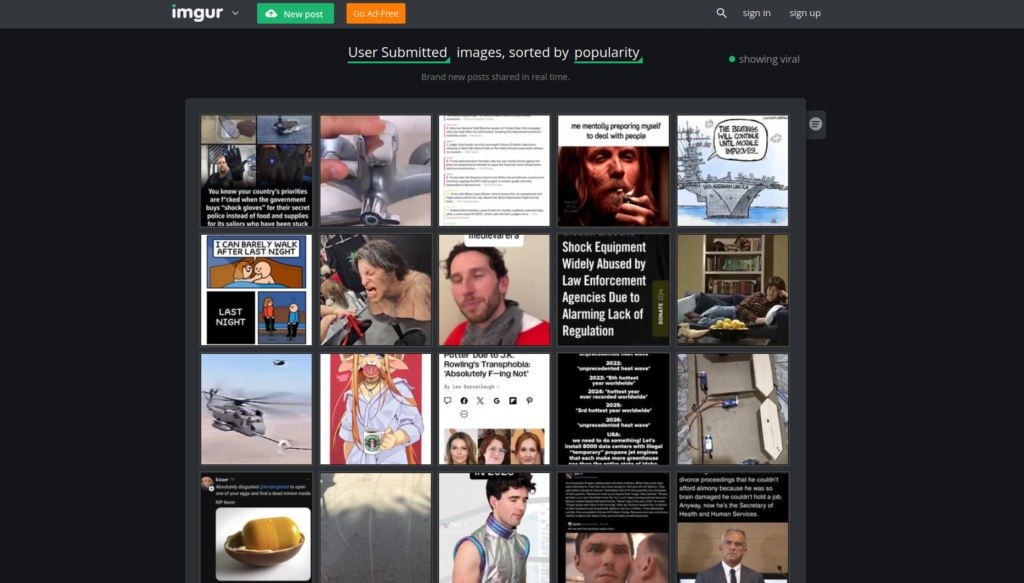
Back then, when the internet was new for many, most websites didn’t have options to upload images directly.
People used to upload images, GIFs, and video content on Imgur.com and grab the Imgur link to share with others online.
Imgur.com became popular because, back then, Reddit didn’t offer an option to upload images/videos directly.
Many Redditors upload the content on Imgur and then post the Imgur link on Reddit.
Imgur enjoyed free traffic for years, then became a million-dollar business that MediaLab AI acquired in 2021.
Imgur offered a simple solution, which is now a company valued at 4 million.
When I discovered this, I asked myself: What if I replicate this strategy?
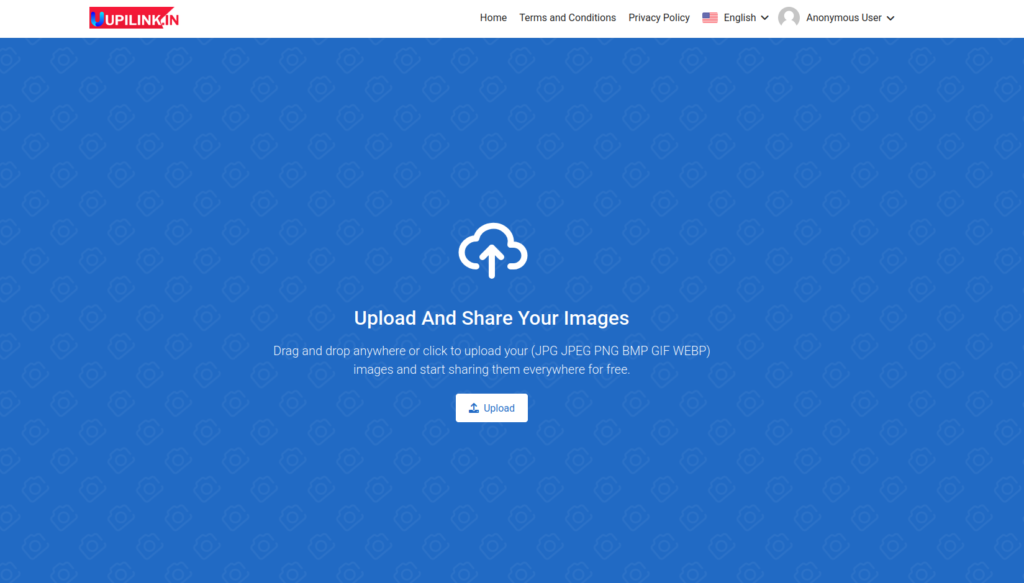
At that time, I didn’t have the money to buy a new domain name, so I created a subdomain on my existing website and started my own image-hosting site.
In the early days, I browsed the internet to find viral screenshots of tweets, sports stats, and political memes.
I uploaded them to my image-hosting website, then shared the link on Reddit and other social media platforms.
I used to get a few hundred people visiting my site to view the content every day.
Gradually, the traffic increased to thousands of page views every day.
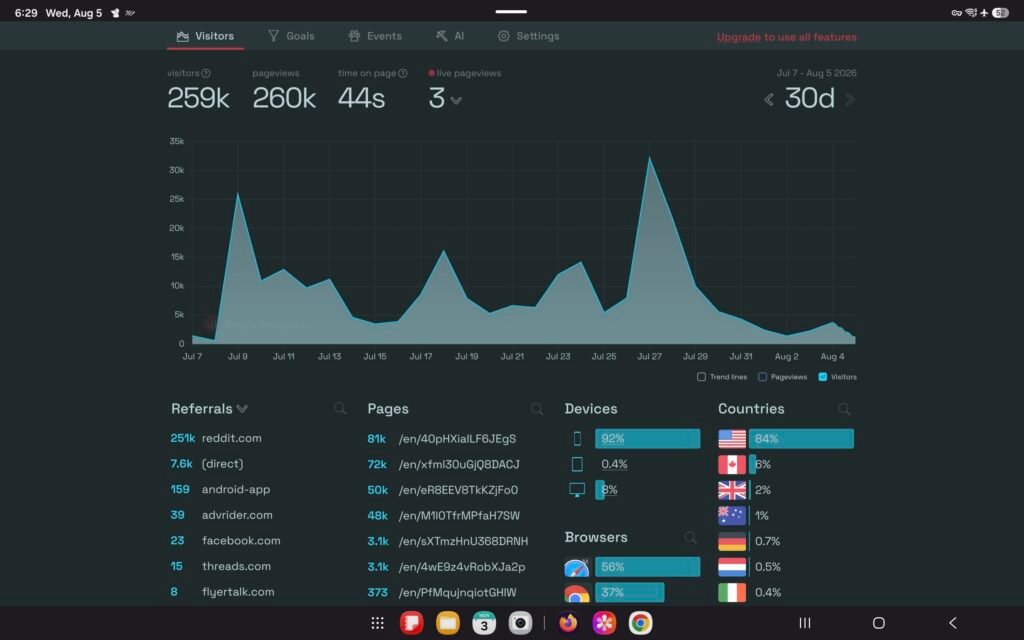
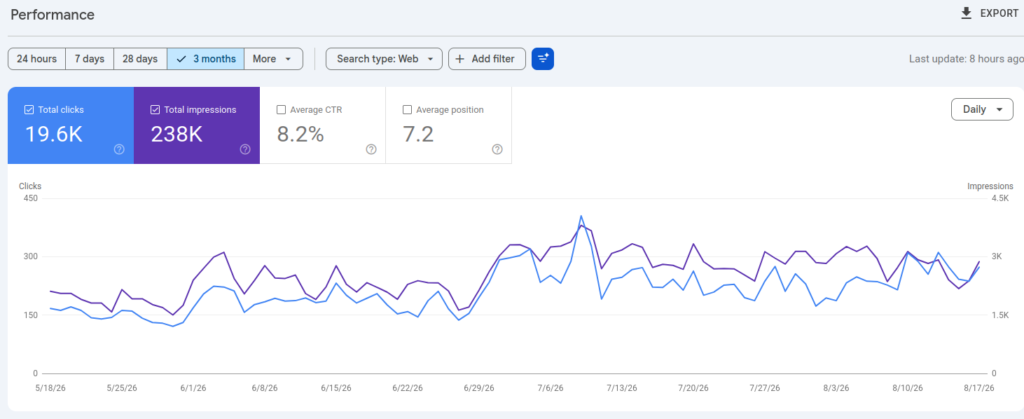
259k visitors in 30 days, ~98% from Reddit. These are the traffic stats of my Image Hosting Site. The traffic spikes happen when one of my links goes viral.
I used display ads to monetise my website. Soon, I started earning a couple of bucks.
Over time, revenue increased, and I was earning around 1k to 2k from ads alone.
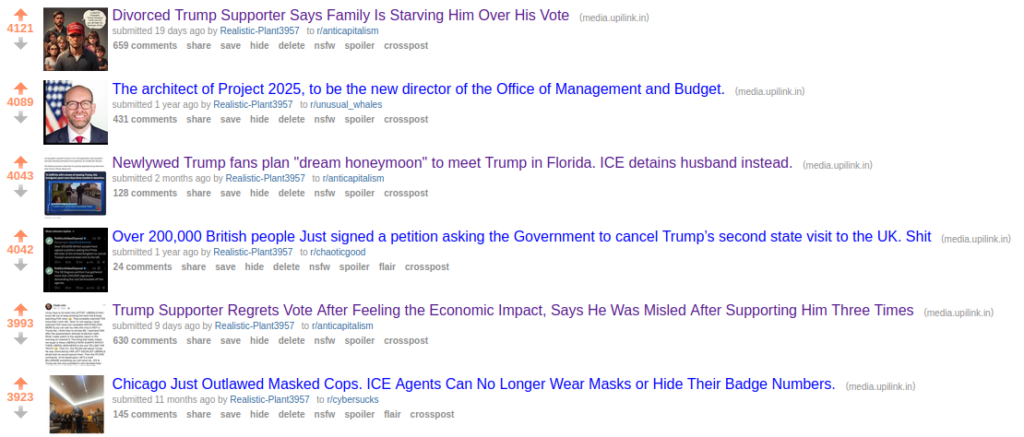
These are some posts that went viral. According to my experiments, political content gets massive traction on Reddit.
I tried a few other ways to monetise this website, but nothing worked besides the ads.
This fun little experiment made me easy money.
Now, let’s be honest: not everything is easy peasy; this method has pros and cons.
Pros
Cons
Easier to get started. A domain name and a web hosting plan are all that you need to get started. You can build your own image-hosting site or use the custom CMS I have provided for members.
Getting ad network approval. Usually, a new site with little or no content will be rejected by Ad networks. You will need to add valuable content before submitting for review on AdSense or any other ad networks, for that matter.
Rinse and Repeat. Download viral content from the internet, upload it to your website, post links on social media platforms, kick back, and relax.
Finding a Relevant Subreddit. Reddit has thousands of subreddits. Finding a relevant subreddit takes time.
Not Limited by Niche: Unlike blogs and YouTube channels that force you to stick to one topic, an image hosting site lets you host absolutely anything – from politics to sports.
Reddit Mods: If you were on Reddit, you probably know that Reddit Mods control the subreddit. They make the rules, and they can kick anyone out at any time.
In many subreddits, mods strictly enforce self-promotion rules. If you post links to your websites, YouTube channels, or anything that directly benefits you personally, it will be considered self-promotion.
The Reddit mods could remove your posts, put your username under a spam filter, or, in the worst case, ban you permanently from the subreddit.
Over the years, I’ve learned a few quirky tricks for self-promotion that helped me avoid pesky Reddit Moderators.
I have published a guide to help you navigate subreddit rules and do self-promotion without getting kicked off Reddit.
If you are new here, feel free to join my community and get access to exclusive resources and support.
Starting a news website is a great side hustle, especially if you love writing articles.
News content is consumed every day around the world, in many different languages and forms, like digital media, print media, and television.
You don’t need to build a full-scale news organisation or apply for a licence. Honestly, you don’t even need to break the bank to get started.
Making money from a news website is pretty straightforward.
You can monetise with display ads through AdSense, add paywalls for exclusive articles, and introduce a monthly subscription for a premium experience that unlocks access to exclusive articles, removes ads, etc.
You can also publish sponsored articles and promote affiliate products and services.
Before you decide to launch your news website, take time to review the pros and cons.
Pros and cons of starting a News Website as a side hustle.
Pros
Cons
Traffic Potential: Millions of people read the news every day. Unlike niche blogs—where audiences are limited, and multiple publications compete for the exact same readers—you never have to worry about running out of traffic.
Content Cycle: News never stops. Writing articles every day yourself will burn you out sooner or later. As you start earning a good profit, consider hiring a remote worker to write articles. Many skilled writers on Fiverr and Upwork are available for long-term projects. I have written a short note just below this table; check that out for more info.
Diverse Monetisation Options: You are not limited in how you monetise your news website.
Legal Issues: Publishing news comes with liability. If you publish incorrect information or fail to properly attribute sources, you risk defamation lawsuits.
Compounding Growth: As you publish more content, your traffic will steadily increase. Over time, your news website will build authority with search engines, creating a powerful snowball effect.
Algorithm Dependency: Many news sites rely heavily on traffic from Google Search, Google News, and social media platforms. Consider building an email list and diversifying your traffic sources.
Note: On WordPress, you can assign role-based access for writers; they can only write and draft articles. With role-based access control, writers will not be able to view or manage any other website settings. As an admin, you can review the draft and publish the article from your admin panel.
Freelancers from Bangladesh and the Philippines are known for their solid work experience, and their rates are often more affordable than others.
Building web apps as a side hustle can be fun and rewarding.
If you don’t work in web development and have never heard of web apps, think of them as applications hosted on web servers.
You can use them directly in your web browser without installing them on your computer or mobile phone.
Popular examples include online PDF converters and online image compressors.
Since the rise of AI coding, I’ve noticed a huge number of web apps being developed. Often, I see people building things nobody needs, which wastes their time and resources.
They’re like monkeys with computers in their hands.
Don’t be like those monkeys. Focus your time and resources in the right direction, and do something that could actually help people in their everyday lives.
Note: Especially when you use AI for coding, you know that these giant data centres, the backbone of AI, are destroying our nature; we should use AI mindfully, just as we do with non-renewable energy.
I would say everybody should learn to code and reduce the dependency on AI. In the near future, the cost of AI services will skyrocket, and many of us won’t be able to afford them.
I will share with you some practical tips on building web apps, marketing them properly, and, of course, monetising them to earn passive income.
Pros and cons of building web apps as a side hustle
Pros
Cons
Infinite Scalability: Unlike freelancing or consulting where you trade your time directly for money, software scales. A web app can serve 10 users or 10,000 users with roughly the same amount of effort once the core product is built.
The Distribution Trap: Building the app is usually only 20% of the work; the other 80% is marketing. Many developers build a great product and assume users will find it magically. Proper SEO helps you reach real consumers.
Requires little investment: The financial barrier to entry is near zero. With open-source frameworks, free-tier cloud hosting (like Vercel, Netlify, or Supabase), and cheap domain names, you can launch a fully functional product for under £20.
Updates: A web app is a living ecosystem. You will inevitably have to deal with framework updates, deprecated third-party APIs, server outages, and bug reports. This isn’t an issue with simple web apps.
It is an asset: You are building something you own. A successful web app can generate recurring passive income for years.
Competition: Because the barrier to entry is so low, the web is heavily saturated. Almost every obvious problem already has multiple solutions, so you have to work harder to find a unique, underserved niche.
Schedule Flexibility: You are your own boss. You can code at 2 AM or on a Sunday afternoon, making it perfectly suited to run alongside a demanding full-time job.
Customer Support: When users pay for a tool, they expect it to work flawlessly. Handling support emails and complaints can be stressful.
Creating content on YouTube is by far the most popular way to earn money online.
We all know that making money on YouTube is possible, and obviously not rocket science, but there are some brutal facts that nobody talks about.
The YouTube algorithm is very demanding. YouTube requires consistency, patience, and creativity. Every day you need to show up, do the same shit, record, edit and publish.
Things don’t stop there. You also need to promote your videos on other platforms to get the initial traction.
If you are a one-man army, I bet you will burn out real soon.
Credit: Jacksepticeye YouTube Channel
Every successful creator you see on YouTube has people working for them. Some help with scriptwriting, recording, editing, etc.
Some top creators even have in-house marketing experts to promote their content across the internet.
I am not saying all this to discourage you; I want you to reconsider whether doing YouTube as a side hustle will be viable for you.
Pros and cons of starting a YouTube channel as a side hustle.
Pros
Cons
Low barrier to entry: You don’t need a massive fund to get started. A good smartphone, natural window light, and free editing software (like CapCut or DaVinci Resolve) are more than enough for your first dozen videos.
Time investment: The amount of time it takes to research, script, film, edit, design a thumbnail, and optimise a title is almost always underestimated. Shit load of work you have to do every day.
You are the boss: You are the director, producer, and star. You get to talk about exactly what interests you, set your own upload schedule, and build a brand around your genuine passions.
High competition: Every broad topic (gaming, finance, fitness, tech) is heavily saturated. Standing out requires you to find a very specific micro-niche or bring a completely unique storytelling angle.
Compounding growth: A highly searchable video you make today can continue to generate ad revenue, affiliate sales, and sponsorships years down the line.
Algorithm dependence: Your growth is largely tied to a recommendation algorithm you don’t control. Building an audience on other platforms like Twitter and Instagram will reduce the dependency on the YouTube algorithm.
Networking: It lets you build a community of like-minded people worldwide and can open doors to unexpected collaborations and career opportunities.
Burnout risk: Balancing a full-time job, personal relationships, and the self-imposed pressure of a weekly upload schedule is exhausting. Creator burnout is incredibly common.
If you still choose to create content on YouTube as a side hustle, I have some practical tips and a step-by-step beginner’s guide to help you get started.
Affiliate marketing is a great option to make money online. In this article, I will not cover the basics of traditional affiliate marketing; instead, I will focus on how you can promote affiliate products and services on Reddit.
If you’ve researched this topic, you will find that affiliate marketing on Reddit is very hard because people on Reddit hate marketers.
In Neil Patel’s words, Redditors can smell marketers miles away.
Many subreddits have rules specifically meant to prevent people from posting affiliate links without prior permission from Reddit moderators.
As the saying goes, if there is will, there is a way.
In this article, you’ll learn how easy it is to promote an affiliate product/service on Reddit.
First, let’s look at some pros and cons of promoting affiliate products and services on Reddit.
Pros
Cons
Targeted Audience: With over 100,000 active subreddits, you can find a dedicated community for almost any niche, from personal finance to software and obscure hobbies.
Scepticism: Redditors have a legendary hatred for spam and traditional marketing. If you sound like a salesperson, your post will be aggressively downvoted or permanently banned from the subreddit.
High Intent and Trust: When users ask questions on Reddit, they are actively looking for solutions. If you provide a genuinely helpful answer that includes a relevant product, conversion rates can be exceptionally high.
90/10 Rule: You cannot just drop links and leave. Reddit’s unwritten rule is that 90% of your activity must be genuine community participation, while only 10% can be promotional. This doesn’t apply to the method I’ll cover in this article.
Cost-Effective Traffic: You do not need a massive ad budget to get started. Authentic, high-quality posts can rank well both on Reddit and on Google search results for free.
You Do Not Own the Audience: When you build a following on a blog or through an email list, you control that audience. On Reddit, you are entirely at the mercy of the platform.
Feedback: Engaging with a community helps you understand exactly what your target audience is struggling with; you can then refine your marketing strategy.
Competitors: Reddit is an open forum, which means your competitors are watching. Competitors often maliciously report your posts/comments to moderators as “spam” to get you banned and clear the field for themselves.
Now that you understand both the pros and cons, let’s move to the step-by-step guide for promoting affiliate products and services on Reddit.
Thousands, if not millions, of apps exist for both Android and iOS, and people download and use them every day for business, productivity, communication, and entertainment.
Both corporate and independent developers are generating an insane amount of money from mobile apps.
Unlike web apps, which we discussed earlier in this article, building and maintaining mobile apps is not easy.
You need strong coding experience and must be willing to spend hundreds of hours building a high-quality mobile app.
Building and publishing the app on app stores like the Play Store and the Apple App Store is just a part of the puzzle.
You need to monitor the KPI, improve the app, fix bugs and vulnerabilities, and, of course, drive downloads.
Honestly, I wouldn’t recommend this to people who aren’t very skilled in coding or who have a full-time job; they won’t be able to do everything by themselves.
To start building mobile apps as a side hustle, you need to meet these requirements.
Must have coding skills.
You must have at least £100 to £500 for the initial investment. You will need to pay for a developer license, and if you use cloud infrastructure for the backend, that also costs money.
You must have experience marketing the app. This is way more important than the previous 2 requirements. Even if you publish a high-quality mobile app, if nobody uses it, you won’t make a dime.
Pros and cons of building mobile apps as a side hustle
Pros
Cons
Scalable Revenue: A successful app monetised via ads, in-app purchases, or subscriptions generates income 24/7.
Brutal Competition: The stores are aggressively crowded. Standing out organically is rare; success usually requires a dedicated marketing budget or finding an extremely underserved, hyper-specific niche.
Low Financial Investment: Beyond developer account fees £99/year for Apple, a one-time £25 fee for Google and basic server costs, your primary investment is just your time.
High Maintenance: API’s and libraries depreciate over time. You must constantly push updates to support new OS versions, patch security vulnerabilities, and fix bugs.
Global Distribution: The iOS App Store and Google Play instantly put your app in front of billions of smartphones without requiring you to build a distribution pipeline.
Taxes and Gatekeeping: Apple and Google take a 15-30% cut of your revenue. You also have to navigate their strict, sometimes unpredictable review guidelines, which can delay or reject your launch.
Multiple Revenue Options: You are not locked into one business model; you can seamlessly pivot between one-time purchases, subscription tiers, ad placements, or even sponsorships to see what maximises your revenue.
Churn Rates: Driving downloads is only the beginning. The average mobile app loses nearly 90% of its daily active users within the first 30 days. Keeping users engaged long-term requires constant content updates, push notifications, and feature releases.
After going through the pros and cons, I hope you understand how much effort it takes to build and maintain a mobile app.
Building and maintaining software, websites, apps, and extensions from scratch isn’t viable for small and medium businesses, so they rely on marketplaces like CodeCanyon.
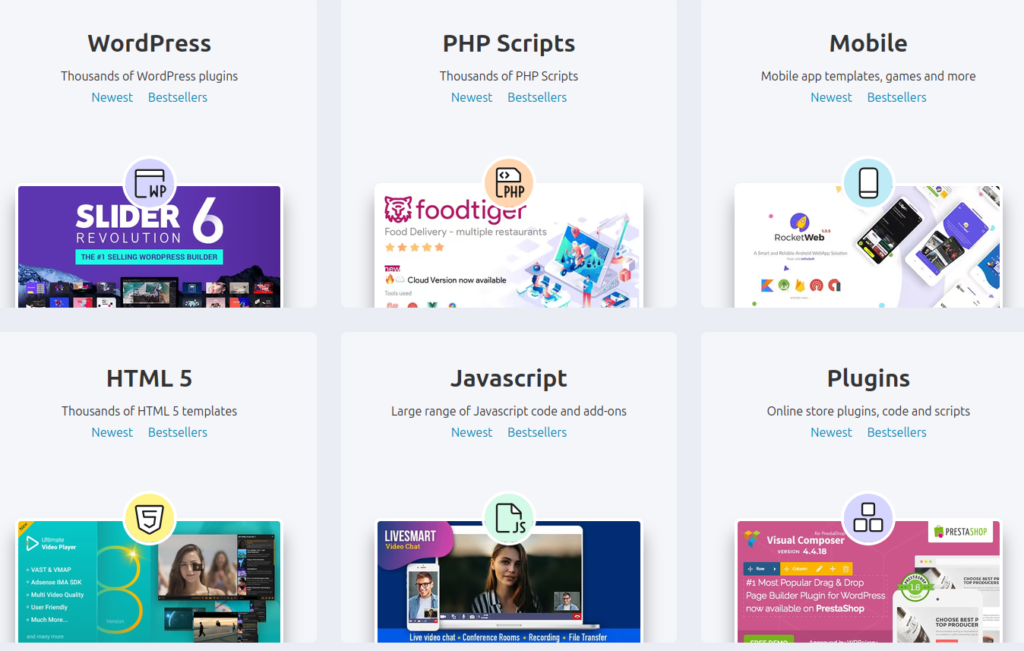
Envato owns several marketplaces, including CodeCanyon, ThemeForest, AudioJungle, GraphicRiver, VideoHive, and more.
Basically, they are like Amazon and eBay but for digital products only. Individuals, businesses and agencies buy from these marketplaces.
You might already know how to create and sell digital products, but here I am talking specifically about selling through Envato-owned marketplaces.
Why Envato?
You might wonder why I can’t just list the product on my website or social media and sell it, or use platforms like Gumroad.
As I mentioned before, these marketplaces are like Amazon; they have a solid reputation around the world, they have millions of buyers, and they do all the heavy lifting for you, like handling payments, disputes, taxes, invoicing, licensing and insane exposure for the product you sell on their marketplaces.
When we buy anything on Amazon or eBay, we rarely think before entering our card details; we trust these e-commerce sites with our money.
If you sell items on your website, buyers often doubt product quality and after-sales support, and worry about getting scammed. They don’t know you, so they don’t trust you with their money.
When you list your item on marketplaces like CodeCanyon, that same buyer will buy your product without thinking too much because they’ve already bought several things from that marketplace; for them, it is like shopping for groceries. They know that if anything goes wrong, Envato will take care of it.
As with any marketplace or platform, selling your products through Envato also has a few downsides. One of the most disappointing things is their fees. They charge a whopping 50% per sale.
I know it sounds crazy; that’s why authors sell via Envato and on their personal website at the same time. You too can do that exactly.
Before we dig deeper, let me list the popular digital products which you can sell online.
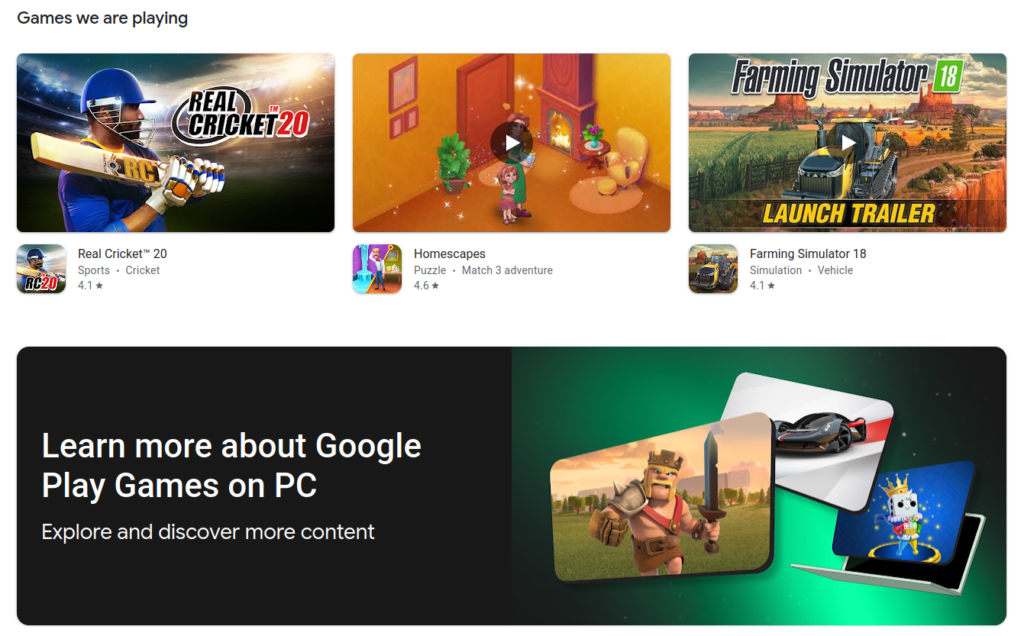
Themes for WordPress, PHP Scripts, Mobile app code for both iOS and Android, HTML Templates, UI/UX Kits for both mobile app and web, HTML5 Games, WordPress Plugins, Project Templates for Premiere PRO, Final Cut Pro, and Adobe After Effects, Stock Footage, Royalty-Free Music, Sound Effects, Print templates, Vectors and Graphics, Stock Photos, 3D Models, 3D Printing Files, and Game Assets.
If you are good at creating any of the above digital products, you can sell them on Envato and make a shit load of money.
Note: I intentionally excluded ebooks and online courses because Envato-owned marketplaces don’t support them. If you wish to sell ebooks and other stuff, you may need to sell them on other marketplaces.
As usual, let’s look at the pros and cons of selling digital products as a side hustle.
Pros
Cons
Profit Margin: Because you only create the product once, the cost of replication and delivery is near zero. No manufacturing, warehousing, or shipping costs eat into your profits.
Competition: Because barriers to entry are low, you will likely face significant competition in popular niches. Standing out requires strong branding and marketing.
Passive Income: Once you build and automate your digital asset (like software, templates, or plugins), customers can purchase and download it 24/7 without your active involvement.
Piracy and Theft: Digital files are easy to copy. Intellectual property theft, unauthorised sharing, and piracy are constant risks you must manage with secure platforms.
Global Reach: With the internet, your potential customer base is worldwide. Anyone in any time zone can buy and access your product instantly.
Customer Support: Customers may struggle to download files, install software, or understand how to use your product, so you’ll need clear documentation or a help desk.
Flexibility: You can run this business from anywhere with an internet connection, work on your own schedule, and pivot your offerings easily.
Updates: Depending on the niche (like software, tech guides, or marketing strategies), digital products can become outdated quickly, forcing you to maintain and revise them.
If you are not living under a rock, you know the trend of using a 3D printer to make all sorts of useful or unnecessary stuff.
Creators worldwide are using 3D printing not just to make stuff, but to record time-lapse videos for social media.
There are several ways you can use a 3D printer to make money as a side hustle.
Sell 3D print files
Sell 3D printed items
Sell 3D design services.
Sell 3D scanning services if you can afford to buy a scanner.
Create time-lapse videos for TikTok, Instagram, and YouTube Shorts.
3D design courses.
If you are interested, click the link below to read a relevant step-by-step guide
Read:
Step-by-step guide for selling 3D print files
Step-by-step guide for selling 3D printed items
Step-by-step guide for selling 3D design services.
Step-by-step guide for offering 3D scanning services
Step-by-step guide for creating time-lapse videos of 3D printing and publishing them on social media.
Step-by-step guide for selling 3D design courses.
Here are some general pros and cons of making money with a 3D printer.
Pros
Cons
Low Barrier to Entry: A highly capable, modern entry-level printer and a few rolls of PLA filament can get you fully up and running for under £300.
Maintenance: You will inevitably spend time dealing with clogged nozzles, tangled filament, bed adhesion issues, and failed prints.
Profit margins: A standard 1kg spool of filament costs around £15–£25 and can yield dozens of items. A custom tool or desk toy that costs £0.80 in raw plastic might easily sell for £10 to £15.
Licensing rules: You cannot legally sell prints of copyrighted characters or models you simply downloaded for free online. You must either design your own files or pay for commercial licenses
Production: Once a print starts and the critical first layer goes down successfully, the machine does the heavy lifting. You can run long prints overnight or while at your day job.
Aggressive Competition: Because it is cheap to start, marketplaces like Etsy are flooded with identical items like articulated dragons and basic planters. You have to find a specific, unique niche to stand out.
Zero inventory risk: You operate purely on-demand. No need to place bulk orders from overseas factories or store boxes of unsold product in your garage.
Post-Processing: Prints rarely come off the bed ready to sell. Removing support structures, sanding away rough layer lines, chemically smoothing surfaces, or painting pieces can take longer than the print itself.
Earning Potential: As I have mentioned, there are 6 ways you can make money with 3D Printing and Services. Regardless of which option you choose, you could expect to make anywhere between £10 and £500 per month initially; as you grow, you could scale it.
Wrapping up
Offering 3D printing and related services is a great side hustle. You will have full control over design, manufacturing, and selling end products or the design files.
You can start by creating cool gadgets and showing them to friends and neighbours; if they find them useful and interesting, they could become your first paying customers, and soon others will find out about your work, which could snowball your growth.
9. Internet Bots
Internet bots have a very bad reputation because of their aggressive scraping and other illegitimate actions, but many useful bots work 24/7 fully autonomously, helping people around the world.
Some developers make little to no money from the bots they made, while others rack up wealth by offering paid APIs and selling data to businesses. I am against selling data, but there are many other ethical ways to monetise Internet bots.
If you use Telegram, you’ve probably come across Telegram bots at some point. These bots are hosted to work in Telegram. Before we dig into the technical stuff, I would like to mention a few popular bots so you can get a sense of the topic.
Pingdom / Uptime Bots: These bots are widely used by web developers to keep tracking the website uptime and get alert if any site or instances goes down.
10. Online Tutoring
Thanks a lot for taking the time to read my article. I hope you found it interesting and useful.
Join my community, Mount Hustle Society, to access exclusive resources that can kick-start your side hustle and get genuine support when you need it. You will also be able to connect with like-minded people and network with them to fast-track your business growth.
Benefits of Mount Hustle Society Membership
Digital Products:
Custom CMS to start your own image-hosting site.
Reddit Marketing Guide: A must-have guide for anyone who wants to do self-promotion on Reddit.
Keyword Finder for Old Reddit PRO Version: The pro version of this extension is available for members only.
Support:
As a member, you can contact me anytime for help with installation and to customise the custom CMS.
If you ever feel stuck or need advice, you can reach out anytime.
Community:
I have a members-only subreddit where you can interact with other members, network, and thrive togeer.
A step-by-step guide to building and monetising web apps.
Step 1. Find what kind of web apps people are searching for.
Build what people are actually looking for, not just what you want them to use.
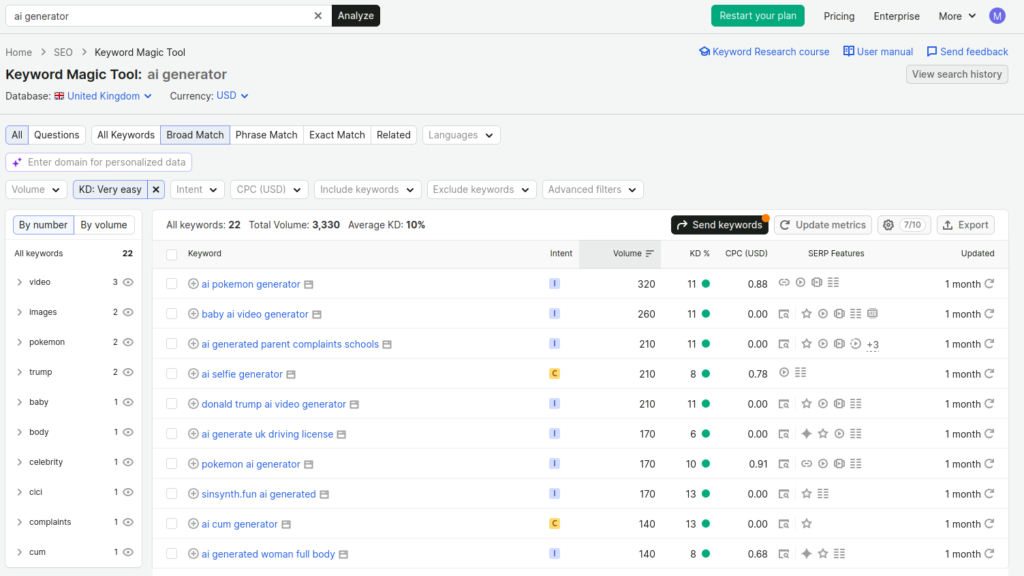
Using Semrush, you can find what people are searching for and the keyword difficulty score.
If you’re new to search engine optimisation, I will explain everything shown in the screenshot above.
I selected the region “United Kingdom” and used a generic keyword to find potential keywords related to web apps.
Then I selected “Very easy” to filter out highly competitive keywords.
Right now, it is showing keywords with KD scores between 8 and 13.
You should further narrow it down to a keyword difficulty score of 0 to 1.
This step is especially important if you’re starting with a fresh domain name.
A new domain name has zero authority in the eyes of search engines. As the domain ages and more backlinks from high-authority sites point to it, your domain authority will increase.
Many other factors affect site authority, so don’t take my word as absolute fact; this article is just to help you get started and explain the basics.
When your domain authority increases, you can start targeting keywords that have higher keyword difficulty scores.
Let’s look at another example.
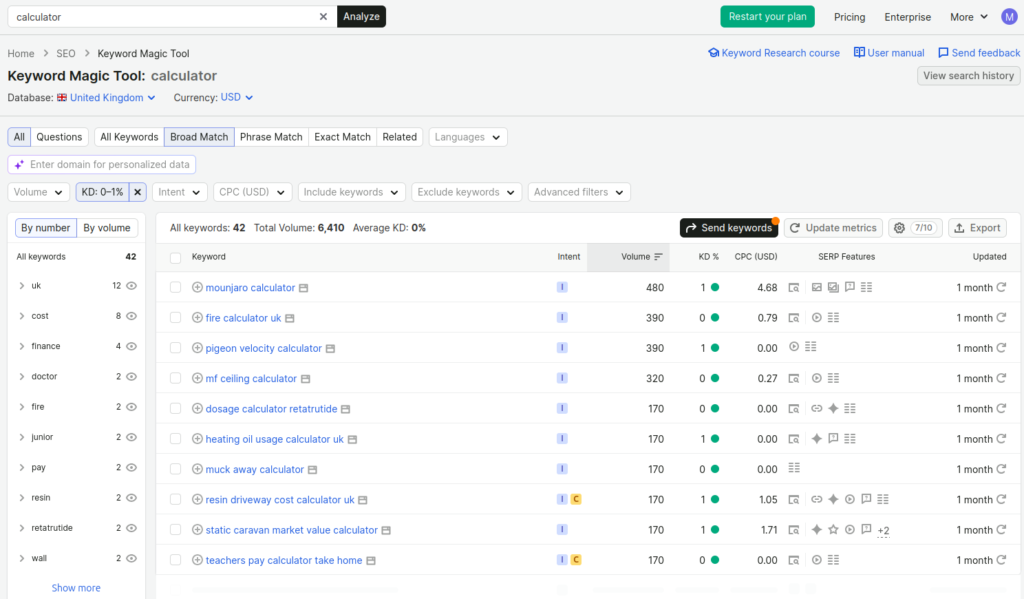
Here, I searched for calculator and narrowed it down to a keyword difficulty score between 0 and 1.
Now I have a list of ideas for making a calculator for specific needs.
For example, I will go with the keyword “teachers pay calculator take home”.
First, I need to understand the intent of this keyword. What is the person trying to calculate?
The person is trying to find how much a teacher will earn after taxes and other deductions, such as pension contributions.
Now the intent is clear, and I know the search is coming from the UK, so our calculator must account for the teacher’s salary in the UK, plus UK-specific taxes and pension funds, to calculate the salary after deductions correctly.
Last but not least, the keyword difficulty score of this particular keyword is 0. This means it is extremely easy to rank for this keyword on Google.
I know the search volume is 170, which means searches for this keyword are extremely low. I won’t be getting much traffic for this specific calculator, but that’s fine; you don’t have to take the volume metric seriously- it’s just an approximate value, and as you keep building more web apps, the overall traffic of your site will increase.
We have done the keyword research and completed the first step. Let’s move on to the next step.
Step 2. Build the web app.
Depending on your choice, you can either code this calculator yourself or use AI coding tools to build this calculator.
Follow on-page SEO best practices, like adding metadata and including a sitemap and robots.txt to help the site get indexed properly.
Step 3. Buy a domain name.
Buy a domain name for your web app website. Connect the domain to your hosting server.
You can host web apps for free on Vercel and Netlify. Both offer a generous free tier.
After deploying, test it in popular browsers like Chrome, Firefox, and MS Edge. Make sure the design is responsive across devices.
Use tools like Seobility’s free SEO checker to find on-page SEO issues and fix them.
Step 4. Add your domain name to Google Search Console
Add your domain name to Google Search Console and verify your domain name.
This will help you track SEO performance.
Step 5. Integrate Analytics
Integrate Google Analytics to track your site traffic. If you wish to use a GDPR friendly analytics service, you can opt for Simple Analytics.
Step 6. Monetization.
Making passive income from web apps is quite easy.
You can integrate AdSense and enable auto ads; this lets AdSense display different ad types and potentially increase your ad revenue over time.
Alternatively, you can add dedicated ad slots in sidebars, just below the navigation bar, and in the footer area.
Don’t fill the whole page with ads; that will hurt user experience and can also hurt SEO performance.
If you wish to take monetisation to the next level, consider promoting affiliate products and services that align with the search intent.
For example, I made the calculator for teachers’ net salary; I could promote products and services that align with teachers’ needs.
There are many other ways to monetise web apps besides ads.
I remember when I started working as a freelancer, I embedded a WhatsApp Chat button into one of my most successful web apps. People who visited my web app used to contact me for services like web design and payment gateway integration. I got clients and made new friends along the way. That really helped me a lot during the worst phase of my life.
Step 7. Share on Social Media
Finally, share your web app link in relevant threads. For example, search for something like “teacher job uk” on Reddit. Go to the posts and see if anyone is interested in salary or taxes. If you find such comments, leave a helpful comment and mention your calculator. You can do the same on Quora.
Don’t spam your link everywhere on the internet.
This step matters; it helps you build backlinks and improve your rankings on Google and other search engines.
Step 8. Rinse and Repeat
Using Semrush’s Keyword Magic Tool, you can discover a lot of potential keywords related to web apps. Use a spreadsheet or a Notion page to make a list of those keywords and work on building web apps targeting each keyword.
As you keep publishing more web apps, your traffic will gradually increase over time, and so will your revenue.
Follow the steps above, and always link new web apps to their relevant category pages; this creates a clear, hierarchical internal link structure for both users and search engines.
Earning Potential: The revenue you can generate with web apps will vary depending upon the method you choose to monetise them.
Display ads alone won’t make you rich, but they’re the easiest way to monetise web apps. I urge you to understand what users need, implement premium features in your web app, and offer subscription or pay-once-use-forever pricing.
Also consider promoting affiliate products and services aligned with the user’s search intent. This can help you make much more money, even with little traffic.
Wrapping up
I hope you understood every step. If you ever need any help, feel free to join my community, create a support ticket and ask me anything.
Every website needs a domain name. It’s a no-brainer.
Come up with a unique yet easy-to-remember name for your news website.
Use a business name generator to get ideas.
Get a domain name with a popular extension like .com or .co.uk, something that looks professional and easy to remember.
Avoid .online or .xyz; these extensions are cheap but can look suspicious because shady sites often use them.
Step 2 – Choose a Web Hosting Plan.
To host your news website, choose a web hosting plan with enough storage for media content.
Choose a plan with at least 20 GB of storage.
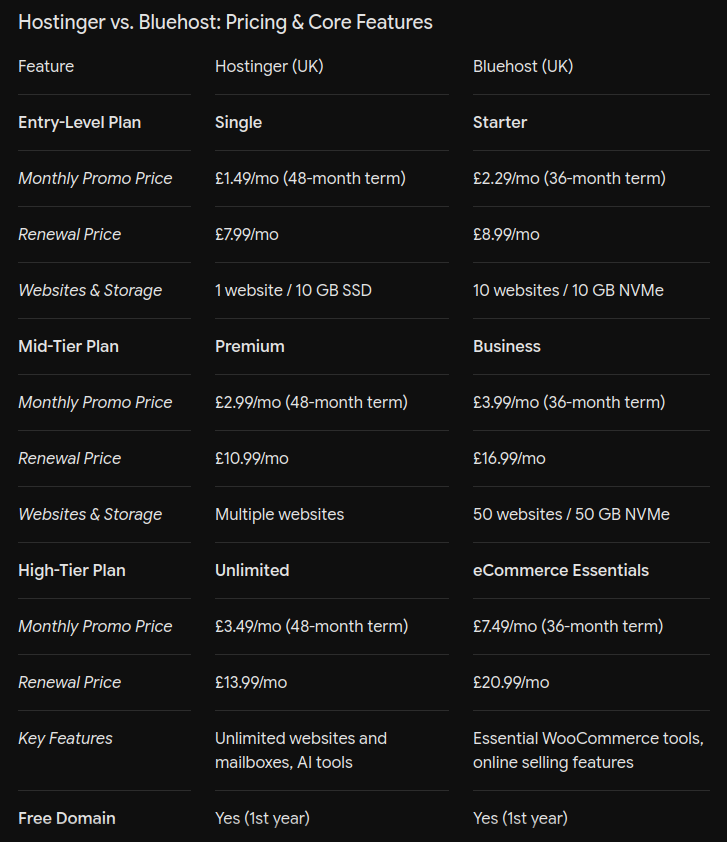
I highly recommend Hostinger and Bluehost; both offer affordable web hosting plans.
Step 3 – Installing CMS
To manage your news website, you need a content management system.
WordPress is a great open-source CMS and perfect for beginners.
WordPress has a ton of extensions, including dedicated plugins specifically made for news websites.
If you have never used WordPress before, I highly recommend checking out Paul Charlton’s YouTube channel. He covers everything from installing WP to full customisation and beyond.
Install WordPress on your web hosting server.
Make sure you have the essential plugins installed and activated.
Recommended Plugin List
BBQ Firewall: This plugin protects your site from a wide range of threats and automated cyberattacks. It’s a must-have plugin.
Rank Math SEO (or Yoast): This plugin is super user-friendly for optimising your news articles for search engines like Google and Bing.
Smush: Smush automatically compresses images in your news articles and featured images, improving page load speed with lazy-loading attributes.
FYI: In simple terms, lazy loading is a technique that delays images and videos from loading until the user scrolls down to view them.
Wordfence Security: Last but not least, Wordfence Security is an all-in-one plugin that protects your site from Hackers and bots. It offers several features to harden your site security.
If you use Wordfence, consider uninstalling the BBQ Firewall, since Wordfence includes a firewall.
Recommended Themes
Newspaper (by tagDiv): The absolute gold standard and best-selling theme for news websites. It includes a custom front-end page builder, built-in review systems, paywall integrations, and hundreds of one-click starter templates.
Jannah: A fantastic alternative to Newspaper. It is highly optimised for speed and includes built-in web push notifications, AMP support, and beautiful mobile layouts.
Publisher: Known for handling heavy content loads well and comes with over 90 pre-designed templates specifically for different news niches (sports, crypto, local news).
Now that the site is ready with essential plugins installed and themes and design being completed, the real work begins.
Step 4 – Writing News Articles
Start by writing your first news article on your news website.
You can either choose a specific niche or go with multiple niches, build categories for each niche, and list articles over time.
The niche you choose should be something you are passionate about: gaming, politics, health, finance, etc.
Before writing, do extensive research and collect images, videos, media bytes, stats and official tweets to include in your article.
Give due credit to authors/source and try to avoid using copyrighted content as much as possible.
Using extensions like Grammarly will help you find and fix errors in your writing.
Publish the article once you have finished writing.
Step 5 – Setting Up Content Delivery System
You wrote the first news article, but what’s the point if nobody reads it?
How will people find your news article?
Here comes the most important part: setting up the content delivery system.
Create a Notion page, or set up a Kanban board on Jira.
Find where your ideal audience hangs out online.
Assuming you are writing articles on politics, check out relevant subreddits like r/ukpolitics and r/uknews.
If your article is related to tech, check out r/technology.
Make a list of all relevant subreddits in your Notion page or Jira Kanban board.
Visit each subreddit and engage with people in comments before posting your news article links.
I know it’s kinda boring, but mate, you’ve got hustle.
That’s the whole point of this article: no pain, no gain. No cap.
Just spamming your links everywhere on Reddit will not help.
There are many other platforms on the internet; some popular ones are:
Twitter, now x.com
Start building your audience on X; tweeting your article link with an eye-catching image can grab attention, boost engagement, and drive more clicks.
Facebook Groups
While the reach of Facebook groups is declining, a handful of niche groups are still worth trying to reach a wider audience.
Google Publisher Centre
This is a great option to get immense exposure for your news website. When your site has at least 30-40 original articles, submit it to Google Publisher Centre.
Google will manually review your site. Once approved, your articles will be available in the Google News App and on the website for millions of users to read.
Bing News PubHub
Bing News is the direct competitor of Google News. By adding your site to Bing’s PubHub, your articles will appear on Microsoft’s browser homepage and Bing News.
Step 6 – Integrate Analytics and Ads.
Install an analytics plugin in WordPress to track site traffic.
Submit your site to AdSense or another ad network, and insert the ad code in your site header.
Using Ad plugins, you can assign ad slots for ad networks. Balance the number of ads and the text content for a better reading experience.
Earning Potential: Your monthly earnings depend on your site’s total traffic and the monetisation option you choose. Display ads usually offer a low CPM rate for news websites.
In the early days, the traffic your site receives will be low, and subscriptions and paywalled articles won’t make sense; however, as your site traffic increases, you can consider offering subscriptions and publishing exclusive articles, which will significantly boost your revenue.
Many independent news sites accept donations from readers; you can do the same with PayPal Donate and Buy Me a Coffee.
Wrapping up
I hope you understood the 6 steps that you need to follow to start and run a successful news website.
Consider offering free weekly or monthly newsletters to build an email list. An email list of dedicated readers isn’t just a traffic source; it is an asset. This will diversify your traffic sources and reduce your dependency on platforms like Google Publisher Centre.
Step-by-step guide for starting your own Image Hosting Website.
Step 1 – Get a Domain Name
Get a domain name for your website. Don’t be tempted to use free domain names; they are worthless. That’s why they’re free.
You can get a cheap domain for £5. Try Namecheap or GoDaddy.
Step 2 – Buy a Web Hosting Plan
To host your website, you will need a web hosting plan. Choose a reputable web hosting service provider. Bluehost and Hostinger are great options.
During Black Friday sales, you can grab great deals on domain names and web hosting plans. Save money wherever possible.
Step 3 – Design the Website
If you have a bit of experience in developing websites, you can use AI coding tools like Cursor or Windsurf to build an image hosting website.
I built a custom CMS for this exact purpose. It’s easy to use and fine-tuned for Hostinger’s LiteSpeed Hosting. It also supports videos, which means you can upload viral video clips and share them just as you would with screenshots.
You can download this script from my Gumroad page.
Feel free to check out the demo site here, or watch the tutorial on how to install this custom cms.
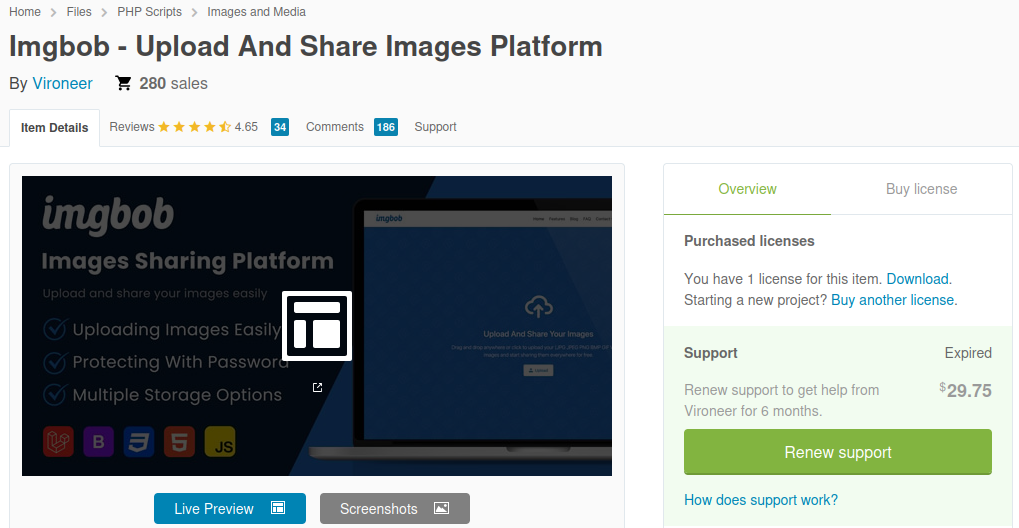
I personally use Imgbob; it’s a polished script, but beginners may find it a bit confusing to install and customise.
You can check my website over here. ( FYI: I disabled guest upload and guest signup to prevent others from uploading to my site. The issue is that some people upload pornographic images.)
I bought the ImgBob script years ago. I can’t quite remember what I paid for it, but it usually goes for around £40 now.
If you grab it on sale, you can pick it up for £22 or less.
Step 4 – Install and configure your website
Upload your website script and install it. Connect your domain name and ensure SSL certificates are installed properly.
Visit your site on mobile devices, tablets if you have and also test in your computer to ensure the displays the images properly across the devices.
Step 5 – Integrate Analytics
You can use Google Analytics to track website traffic. Create a property in GA, copy the tracking ID, and insert it in your site’s header.
You can track what kind of content drives more traffic and which subreddit works best for you.
Use this data to make the right decisions, which can significantly improve your traffic and increase your ad revenue.
Step 6 – Social Shares
Start posting political humour content, sports stats, memes, and screenshots of viral tweets in relevant subreddits and other social media.
Step 7 – Integrate AdSense
Now it’s time to monetise the website. Submit your site to AdSense or any other ad network of your choice. You will need to insert the ad code on your site to verify the domain.
It will take a couple of days for them to review your site; once approved, you will start earning.
Earning Potential: During your first 6 months, you can expect to earn anywhere between £100 and £500 per month. Earnings depend on traffic volume and CPM rate.
Wrapping up
I hope you understood how this quirky side hustle works; if you have any questions, feel free to ask me.
A quick heads up: If my advice ever comes across as a bit blunt or wide of the mark, please take it with a pinch of salt. I’m not the fount of all knowledge, and I certainly get things wrong from time to time.