A step-by-step guide to building and monetising web apps.
Step 1. Find what kind of web apps people are searching for.
Build what people are actually looking for, not just what you want them to use.
Using Semrush, you can find what people are searching for and the keyword difficulty score.
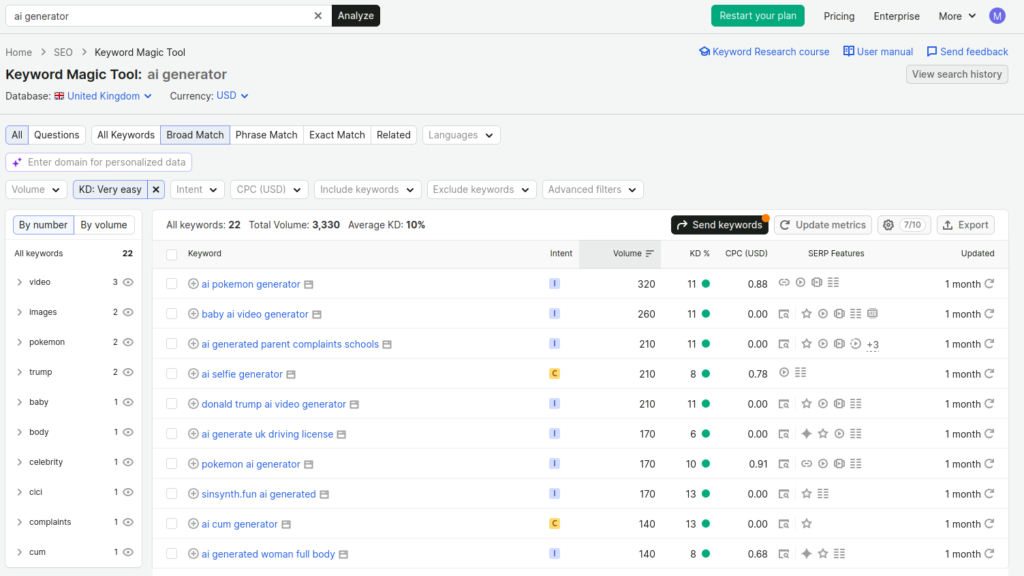
If you’re new to search engine optimisation, I will explain everything shown in the screenshot above.
I selected the region “United Kingdom” and used a generic keyword to find potential keywords related to web apps.
Then I selected “Very easy” to filter out highly competitive keywords.
Right now, it is showing keywords with KD scores between 8 and 13.
You should further narrow it down to a keyword difficulty score of 0 to 1.
This step is especially important if you’re starting with a fresh domain name.
A new domain name has zero authority in the eyes of search engines. As the domain ages and more backlinks from high-authority sites point to it, your domain authority will increase.
Many other factors affect site authority, so don’t take my word as absolute fact; this article is just to help you get started and explain the basics.
When your domain authority increases, you can start targeting keywords that have higher keyword difficulty scores.
Let’s look at another example.
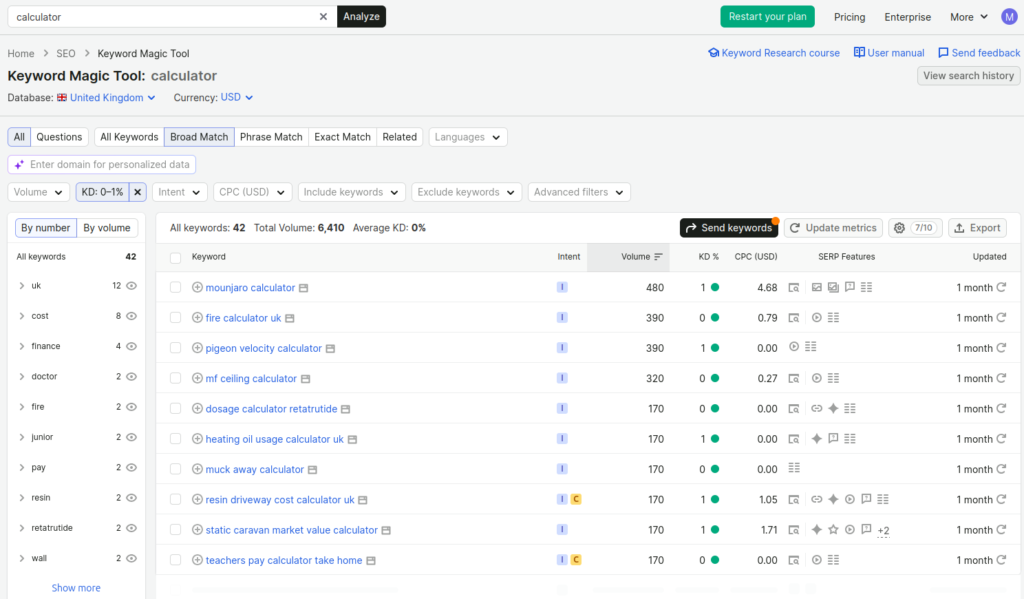
Here, I searched for calculator and narrowed it down to a keyword difficulty score between 0 and 1.
Now I have a list of ideas for making a calculator for specific needs.
For example, I will go with the keyword “teachers pay calculator take home”.
First, I need to understand the intent of this keyword. What is the person trying to calculate?
The person is trying to find how much a teacher will earn after taxes and other deductions, such as pension contributions.
Now the intent is clear, and I know the search is coming from the UK, so our calculator must account for the teacher’s salary in the UK, plus UK-specific taxes and pension funds, to calculate the salary after deductions correctly.
Last but not least, the keyword difficulty score of this particular keyword is 0. This means it is extremely easy to rank for this keyword on Google.
I know the search volume is 170, which means searches for this keyword are extremely low. I won’t be getting much traffic for this specific calculator, but that’s fine; you don’t have to take the volume metric seriously- it’s just an approximate value, and as you keep building more web apps, the overall traffic of your site will increase.
We have done the keyword research and completed the first step. Let’s move on to the next step.
Step 2. Build the web app.
Depending on your choice, you can either code this calculator yourself or use AI coding tools to build this calculator.
Follow on-page SEO best practices, like adding metadata and including a sitemap and robots.txt to help the site get indexed properly.
Step 3. Buy a domain name.
Buy a domain name for your web app website. Connect the domain to your hosting server.
You can host web apps for free on Vercel and Netlify. Both offer a generous free tier.
After deploying, test it in popular browsers like Chrome, Firefox, and MS Edge. Make sure the design is responsive across devices.
Use tools like Seobility’s free SEO checker to find on-page SEO issues and fix them.
Step 4. Add your domain name to Google Search Console
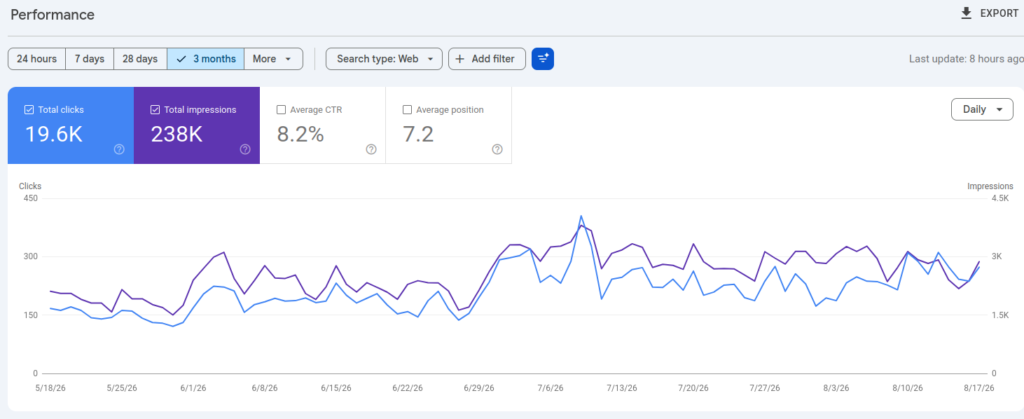
Add your domain name to Google Search Console and verify your domain name.
This will help you track SEO performance.
Step 5. Integrate Analytics
Integrate Google Analytics to track your site traffic. If you wish to use a GDPR friendly analytics service, you can opt for Simple Analytics.
Step 6. Monetization.
Making passive income from web apps is quite easy.
You can integrate AdSense and enable auto ads; this lets AdSense display different ad types and potentially increase your ad revenue over time.
Alternatively, you can add dedicated ad slots in sidebars, just below the navigation bar, and in the footer area.
Don’t fill the whole page with ads; that will hurt user experience and can also hurt SEO performance.
If you wish to take monetisation to the next level, consider promoting affiliate products and services that align with the search intent.
For example, I made the calculator for teachers’ net salary; I could promote products and services that align with teachers’ needs.
There are many other ways to monetise web apps besides ads.
I remember when I started working as a freelancer, I embedded a WhatsApp Chat button into one of my most successful web apps. People who visited my web app used to contact me for services like web design and payment gateway integration. I got clients and made new friends along the way. That really helped me a lot during the worst phase of my life.
Step 7. Share on Social Media
Finally, share your web app link in relevant threads. For example, search for something like “teacher job uk” on Reddit. Go to the posts and see if anyone is interested in salary or taxes. If you find such comments, leave a helpful comment and mention your calculator. You can do the same on Quora.
Don’t spam your link everywhere on the internet.
This step matters; it helps you build backlinks and improve your rankings on Google and other search engines.
Step 8. Rinse and Repeat
Using Semrush’s Keyword Magic Tool, you can discover a lot of potential keywords related to web apps. Use a spreadsheet or a Notion page to make a list of those keywords and work on building web apps targeting each keyword.
As you keep publishing more web apps, your traffic will gradually increase over time, and so will your revenue.
Follow the steps above, and always link new web apps to their relevant category pages; this creates a clear, hierarchical internal link structure for both users and search engines.
Earning Potential: The revenue you can generate with web apps will vary depending upon the method you choose to monetise them.
Display ads alone won’t make you rich, but they’re the easiest way to monetise web apps. I urge you to understand what users need, implement premium features in your web app, and offer subscription or pay-once-use-forever pricing.
Also consider promoting affiliate products and services aligned with the user’s search intent. This can help you make much more money, even with little traffic.
Wrapping up
I hope you understood every step. If you ever need any help, feel free to join my community, create a support ticket and ask me anything.
I would love to help you.
Leave a Reply